Skip to product information
1 of 5

JetKVM

JetKVM ATX Extension Board — Remote PC Power Control

JetKVM ATX Extension Board — Remote PC Power Control

Regular price $19.00
Regular price Sale price $19.00
Sale Sold out
Quantity

Key Features 

Remote Power On / Off

🔄 Remote Reset Control

💡 Real-Time Power Status

🔌 Dual Front Panel Connection

View full details

Turn Your PC Into a Remotely Managed System

ATX Remote Power Control Extension

Control power button, reset button and LED status remotely through JetKVM. Perfect for homelabs, servers, and unattended systems. No physical access required.Manage your PC power remotely from anywhere.

Remote Control, Made Simple


Connect JetKVM to your motherboard’s front-panel header, then control your PC’s power and reset functions from anywhere.

  • Remote Power Control

    Power on, shut down, or restart your PC remotely through JetKVM.

  • Instant System Recovery

    Restart unresponsive systems without physical access.

  • Remote Server Management

    Keep home servers, workstations, and lab systems always accessible.

Technical Specifications

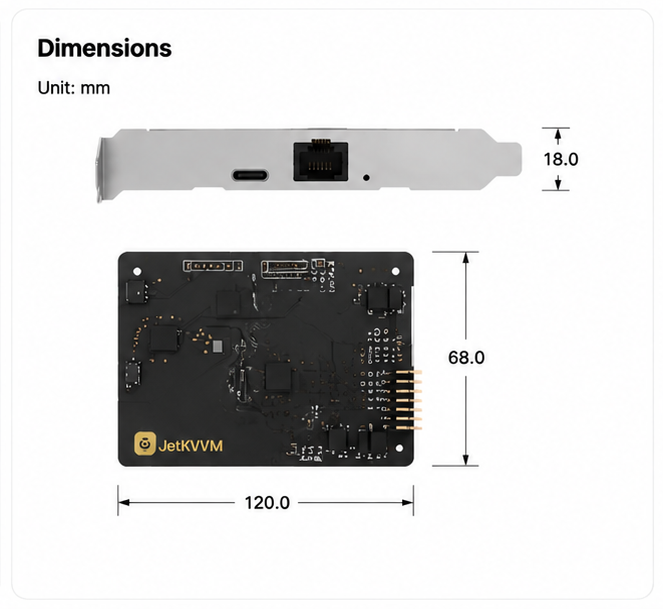
Detailed dimensions, interfaces, package contents, and technical information of JetKVM ATX Extension Board.

JetKVM ATX Extension Board Technical Specifications

FAQ

Does it work with my desktop PC?

The ATX Extension Board works with most standard desktop PCs using a standard ATX front panel header (F_PANEL).

Compatible systems include DIY desktops, workstations, servers, and homelab machines.

Does it require a PCIe slot?

No.

The PCIe bracket is only used for mounting and cable routing. The board does not use PCIe data lanes or require an available PCIe slot.

Will I lose my physical power button after installation?

No.

The ATX Extension Board works as a pass-through interface between your motherboard and case front panel.

Your original power button, reset button, and LED indicators can remain fully functional.

Do I need to change BIOS settings?

For most desktop PCs, no.

The ATX Extension Board simulates a physical power button press, so it works the same way as pressing your PC case button.

Some mini PCs, OEM systems, or unattended systems may require enabling "Restore AC Power Loss" or "Power On After Power Failure" in BIOS.

Can it turn on my PC when it is completely powered off?

What if my PC cannot power on remotely?

Please check:


  • Correct F_PANEL pin mapping

  • Power switch polarity

  • Motherboard manual

  • BIOS power settings for special systems

The ATX Extension Board requires the correct connection to the motherboard power switch pins.